Salary Survey
Members: Purchase Survey Access
Members who answered at least 40% of the questions receive free access to view results and run filtered reports.
You’ll be able to use the Compare feature to see how you compare to other participants for every question in the Survey. Use the Reports and Charts tab to apply filters to compare data in a variety of ways. This feature also lets you view personalized reports (with your data set shown) or non-personalized reports (without your data set shown) for the individual or company.
Since 2014, the SMPS Salary Survey has provided annual updates and comparison reports to the SMPS community, educating marketers about hiring and spending trends of participating companies. This study is the largest compensation and metrics survey of marketing and business development professionals in the AEC industry available today.
SMPS members: have you entered your data in the past? It’s easy with a single sign-on using your SMPS username and password. New to the salary survey? Get started today by using your SMPS member login.
Not a member? You can also review results and previous years’ data. Visit our site to purchase access, complete at least 40% of the questions, and you’ll be set to view data once available in mid-May. Rather become a member for complimentary access? Join now!
If you have any questions or need assistance, contact the SMPS team at knowledge@smps.org.
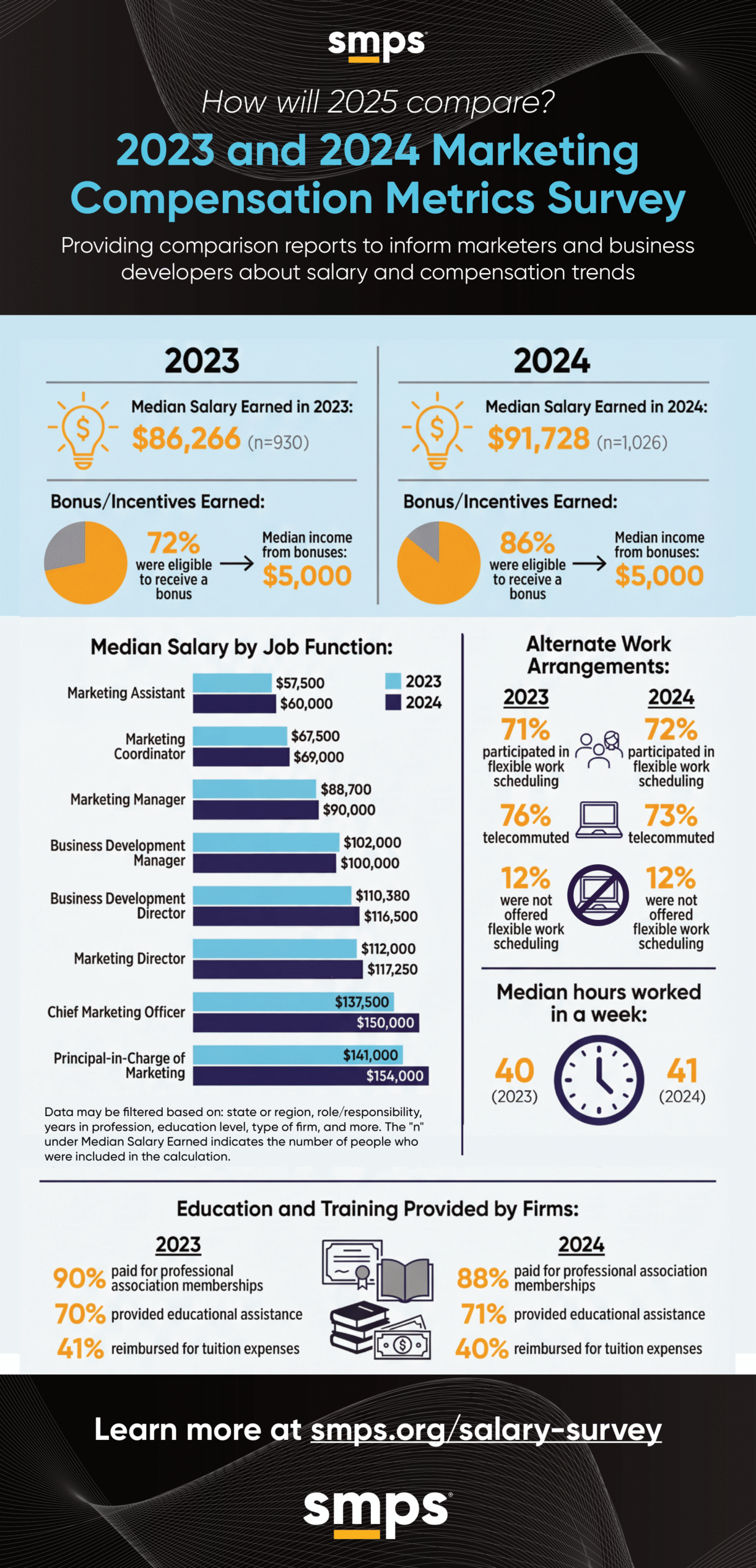
This comprehensive survey allows you to benchmark your salary, compensation, and firm metrics against your peers. How does your compensation package compare?
You can also use this data to inform your next performance review, and ensure that your firm’s compensation program remains competitive.
Comprehensive and filterable report results provide valuable information to help you and your company stay on top of the trends. Results from prior years are also available for comparison.
Members who enter at least 40% of their data will gain free access to view results and run free, filtered reports.
- SMPS Members with participation: Free with answering required questions and 40% of survey.
- SMPS Members without participation: Access to reports: $99
- SMPS student and retired members: receive free access to results by logging in.
- Nonmembers: Survey participation is free, Access to Reports: $199*
*All purchases are final. No refunds will be provided.
- Access the survey by logging in using your SMPS HQ username and password to the SMPS website. (We now have single sign on access to the Salary Survey).
- Want to know what questions we’re asking? Download the data collection worksheet to help you gather your information.
- Begin entering your data if you haven’t already done so. You do not need to complete the survey all in one session.
- If you’ve already entered 40% or more of your data and answered all required questions, you’ll have access to see results, run filtered reports, and view pre-defined charts and reports.
- Bookmark this link for future use.
Run Reports From Previous Years:
If you previously entered data, you may run those reports now:
- Login to the survey (using your HQ log in).
- Select the Compare tab (looks grayed out).
- Set filters and run reports. For help, view this screencast.
Members: Purchase Survey Access
If you don’t enter 40% of your data and want to purchase access for one year (rather than enter data):
- Visit the purchase page.
- Log in using your HQ login to receive the discounted member price of $99.
- Complete the purchase.
- After purchase, please visit the survey portal and navigate to the Compare tab to view results and run reports.
Non Members: Purchase Survey Access
If you wish to purchase access to compensation survey results, reports, and charts for a year, please follow these instructions:
- Visit the purchase page and purchase.
- If you already have an SMPS account and are logged in, go to the survey portal and navigate to the Compare tab to view results and run reports.
- If you had to create an account, SMPS HQ staff will need to process your order; please allow 24 hours. You will receive a receipt when your order is processed.
- Once you receive the receipt, go to the survey portal and navigate to the Compare tab to view results and run reports.
link at the top right of the page once you log in to view the “Quick Start Guide” or to see the survey questions in the “Data Collection Worksheet.” Note: The worksheet is to help you collect your data. You may then use the worksheet to enter your information into the interactive portal. If you need assistance, please send an email to knowledge@smps.org.
- Reminder: Only members that complete 40% or more of the survey can access the reports for free.
- Participate in the survey
Have questions? Please email knowledge@smps.org